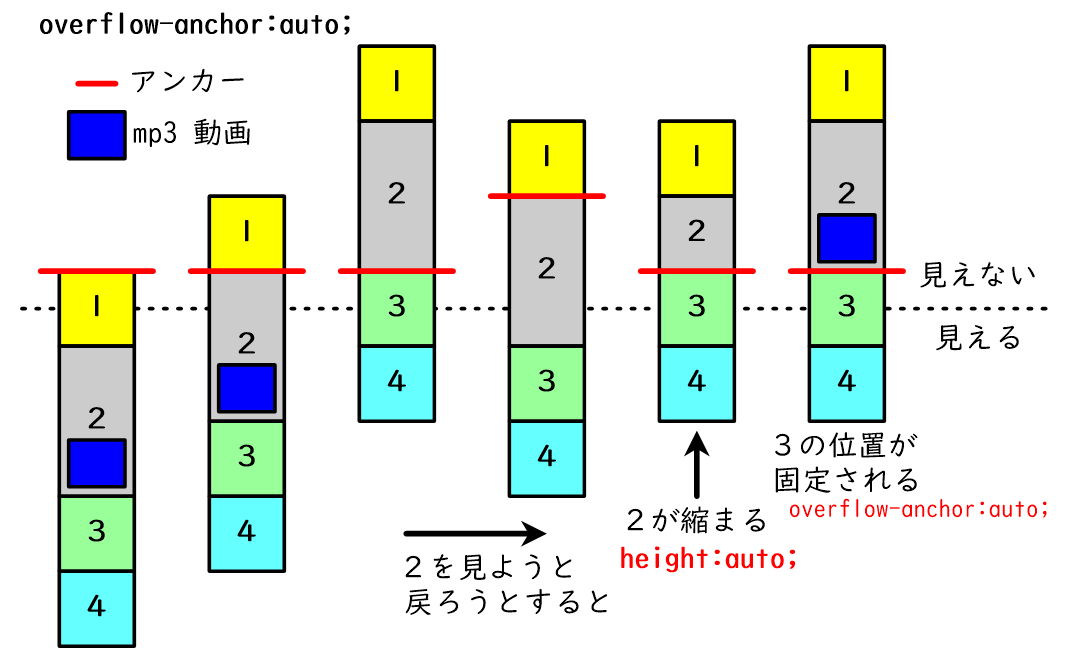
fedibirdのタイムラインを見ている時に上に表示されている投稿に戻れないバグが発生して、mp3音声をアップロードした投稿の下で起こっていそうなので、このバグを再現するコードを作成しながら原因を推測した。
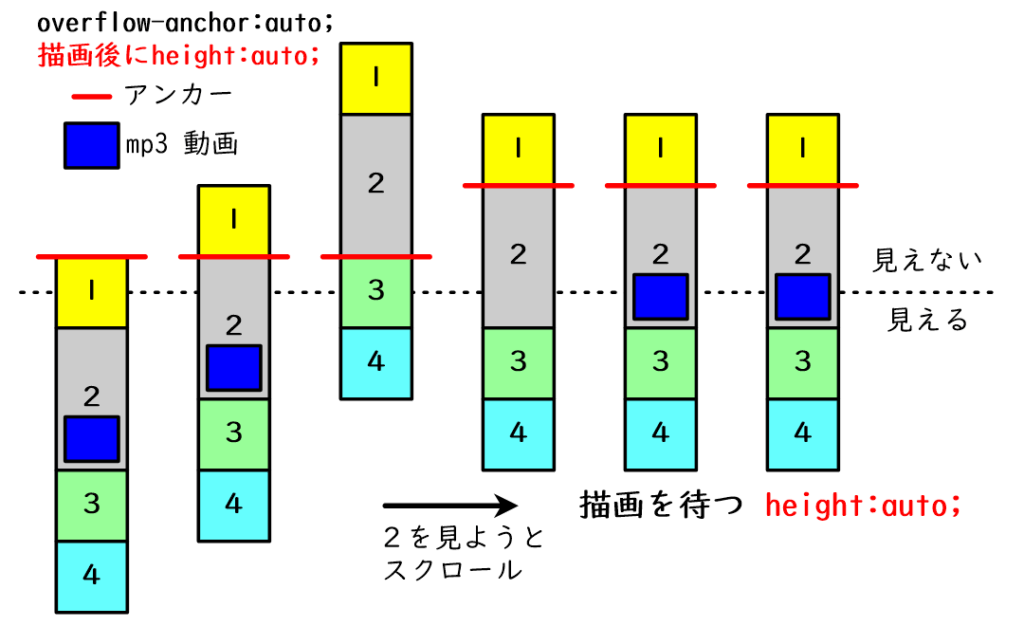
原因は、mp3の含まれる投稿の下端が上に見えた時にタグに記載されてたheightの指定が消えてautoになるが、mp3再生用の動画が描画される前だったので、隠れていた時よりheightの値が小さくなり、mp3を含む投稿の下端が上に引っ張れてしまうことだと思われる。
ブラウザのアドオン Stylus を使って article{overflow-anchor: none;}を指定すると、バグが解消されたように見えるのは、mp3を含む投稿の下端が上に引っ張られた後、mp3再生用の動画が描画され、mp3を含む投稿の下端が下に伸びて見えるようになったのだろう。article{height: auto !important;}でバグが解消されたように見えたのは、mp3を含む投稿が上に隠れてmp3再生用の動画が消えたせいでheightが急に小さくなっても、overflow-anchor: auto; が効いているのでmp3を含む投稿の下の投稿(見えている投稿)の上端が動かず、変化が無いように見え、mp3を含む投稿を見ようとスクロールして戻った時は、mp3を含む投稿はheightが縮むことはないので、そのまま下端が現れて、mp3再生用の動画が描画されたら、その投稿のheightが伸びて下端がさらに下がって、投稿が見えるようになったのだろう。ただし、この場合はmp3を含む投稿が急に現れたように感じるかもしれない。
このバグの解消法として一番良いのは、mp3を含む投稿のheightの指定解除をmp3再生用の動画が完全に描画されるまで待つことだろう。Javascriptのコードは、下に書いたコードが上に書いたコードよりも先に実行されることがあるので、コードの記載の順番を変えるだけではダメで、何らかの工夫が必要かもしれない。投稿が見えている間もheightの指定を解除しない策もあるのだが、本家がそうしない理由は分からない。
さて、それぞれの状態を図で表してみた。
まずは、バグの様子。
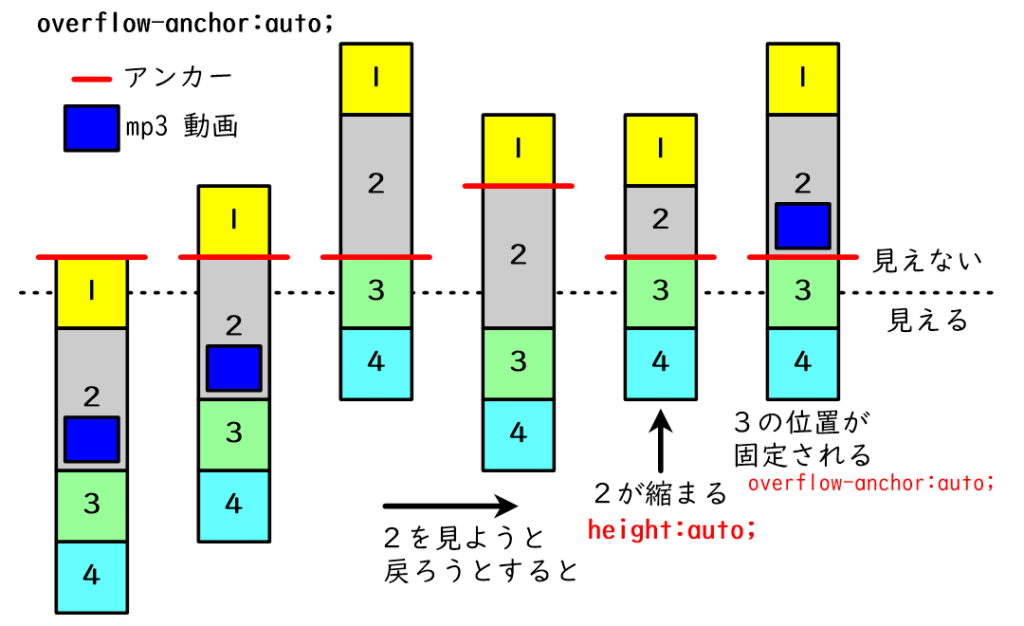
次に、article{overflow-anchor: none;}を指定した場合。
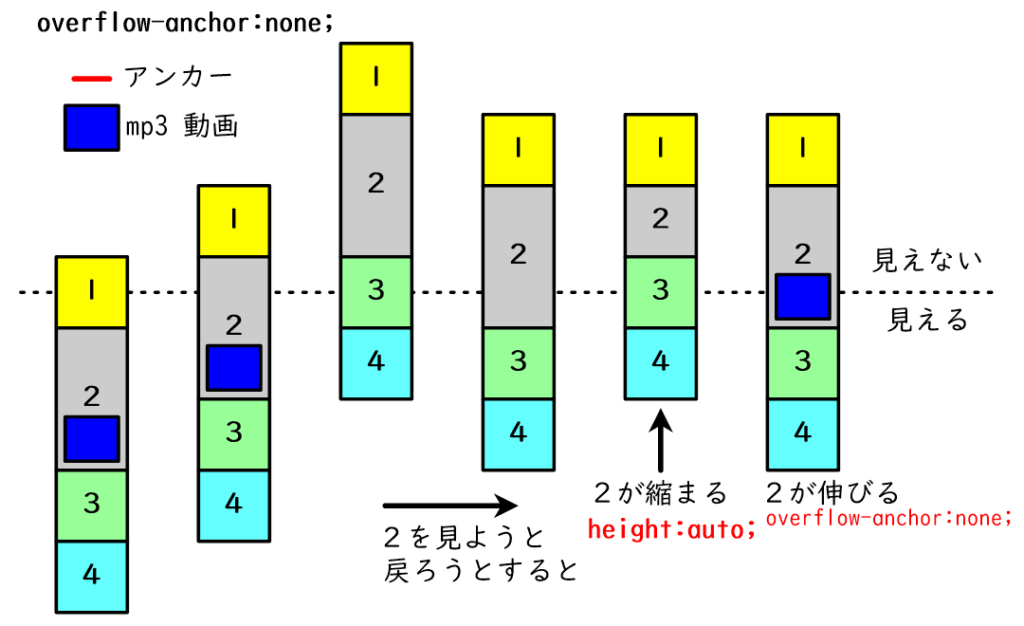
次に、article{height: auto !important;}を指定した場合。
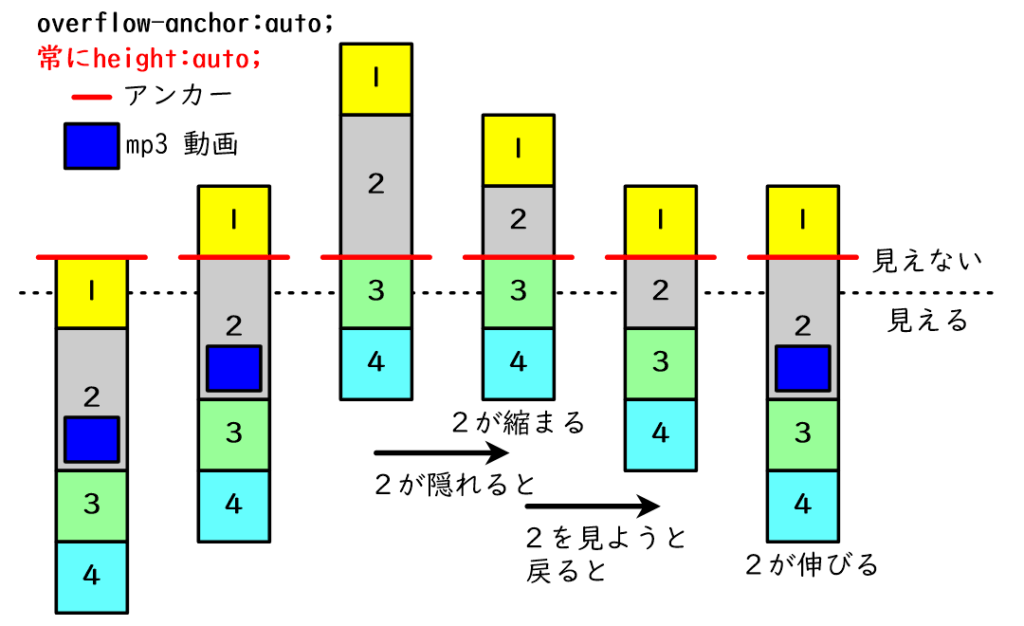
最後に、mp3再生用の動画が完全に描画されるまで待ってからheightを指定解除した場合。
このバグを再現するコードを以前も作ったが、コードが気に入らなかったので、大幅に修正したものを作成した。このコードの場合、たった一行、parent.style.height = ""; をコメントアウトするだけでバグが解消される。
- バグ再現デモ:test20251224-1.html
- バグ解消デモ:test20251224-2.html
test20251224-1.html のコード
<!DOCTYPE html>
<html lang="ja">
<head>
<meta charset="UTF-8">
<meta name="viewport" content="width=device-width, initial-scale=1.0">
<title>スクロールバグ再現実験(20251224)</title>
<script src="https://unpkg.com/wavesurfer.js@7"></script>
<style>
	body { margin: 0; font-family: sans-serif; color: white; text-align: center; }
	section { padding: 50px; display: flex; flex-direction: column; align-items: center; justify-content: center; box-sizing: border-box; width:50%; margin: 0 auto;}
	.inner-box { background: rgba(255, 255, 255, 0.2); border: 2px solid rgba(255, 255, 255, 0.4); border-radius: 12px; padding: 30px; width: 80%; max-width: 600px; }
	.section-1 { background-color: #f39c12; }
	.section-2 { background-color: #2c3e50; }
	.section-3 { background-color: #27ae60; }
	.section-4 { background-color: #2980b9; }
	.section-5 { background-color: #8e44ad; }
	.section-6 { background-color: #c0392b; }
	.play-btn { padding: 8px 20px; cursor: pointer; border-radius: 20px; border: none; font-weight: bold; background: white; color: #2c3e50; }
</style>
</head>
<body>

<section class="section-1" data-id="1"><div><p>セクション1</p></div></section>
<section class="section-2" data-id="2"><div><p>セクション2</p></div></section>
<section class="section-3" data-id="3"><div><p>セクション3</p></div></section>
<section class="section-4" data-id="4"><div><p>セクション4</p></div></section>
<section class="section-5" data-id="5"><div><p>セクション5</p></div></section>
<section class="section-6" data-id="6"><div><p>セクション6</p></div></section>

<script>
const contentTemplates = {
	1: { html: '<div><h1>Section 01</h1></div>' },
	2: {
		html: '<div><h1>Section 02</h1></div>',
		audioUrl: '/wp-content/uploads/2025/12/20240809_1.mp3'
	},
	3: { html: '<div><h1>Section 03</h1></div>' },
	4: { html: '<div><h1>Section 04</h1></div>' },
	5: { html: '<div><h1>Section 05</h1></div>' },
	6: { html: '<div><h1>Section 06</h1></div>' }
};

let wavesurfers = {};
let frozenHeights = {};
let playbackStates = {};

// innerBox内を生成する関数
function setupSectionContent(id, parent) {
	const config = contentTemplates[id];

	// parent(sectionタグ)の中から、先ほど作ったばかりの .inner-box を探す
	const innerBox = parent.querySelector('.inner-box');
	if (!innerBox) return; // 安全策

	// 音声URLが定義されているセクションなら波形を生成
	if (config.audioUrl) {
		// すでに波形がある(または生成中)なら重複を避ける
		if (!wavesurfers[id]) {

			// セマンティックな <figure> 要素を作成
			const figgur = document.createElement('figure');
			figgur.className = 'figgur-container'; // スタイル調整用にクラス付与

			// 内部構造を構築(WaveSurfer用のdivと、フォールバック用の<audio>を配置)
			figgur.innerHTML = `
				<div class="waveform-container" id="waveform-${id}"></div>
				<audio src="${config.audioUrl}" preload="none"></audio>
				<button class="play-btn" id="playPause-${id}">再生 / 停止</button>
			`;
			innerBox.appendChild(figgur);

			// 固有のIDを生成(変数を利用するため)
			const dynamicWaveId = 'waveform-' + id;
			const dynamicBtnId = 'playPause-' + id;

			// --- バグ誘発ポイント ---
			// 1000ミリ秒(増やせば確実)待ってから波形を生成し、高さを膨らませる
			setTimeout(() => {
				const containerEl = document.getElementById(dynamicWaveId);
				if (containerEl && !wavesurfers[id]){
					// そのセクション専用のインスタンスを作成
					// テンプレートから取得したURLを渡す
					wavesurfers[id] = initWaveSurfer(id, '#' + dynamicWaveId, dynamicBtnId, config.audioUrl);
					wavesurfers[id].on('ready', () => {
						// ★ 波形生成完了後に解除
						parent.style.height = "";
						// 波形描画完了後の高さを保存
						frozenHeights[id] = parent.getBoundingClientRect().height;
					});
				}
			}, 1000);
		}
	} else {
		// 一般的なセクションの処理
		requestAnimationFrame(() => {
			// 表示中にheightを保持
			parent.style.height = "";
			frozenHeights[id] = parent.getBoundingClientRect().height;
		});
	}
}

// 音声ファイルの動画を作成する関数
function initWaveSurfer(id, containerId, btnId, url) {
	const ws = WaveSurfer.create({
		container: containerId,
		waveColor: '#ffffff99',
		progressColor: '#ffffff',
		url: url,
		barWidth: 1,
		// height: 200,
		height: getWaveformHeight(),
		responsive: true
	});

	ws.on('ready', () => {
		// ★保存されていた再生情報を復元
		if (playbackStates[id]) {
			ws.setTime(playbackStates[id].currentTime);
			if (playbackStates[id].isPlaying) {
				ws.play();
			}
		}
	});

	const btn = document.getElementById(btnId);
	if(btn) {
		btn.onclick = () => { // クリックした時に実行する関数を登録する
			ws.playPause();
			// 再生状態をメモ
			if (!playbackStates[id]) playbackStates[id] = {};
			playbackStates[id].isPlaying = ws.isPlaying();
		};
	}
	return ws;
}

// --- 波形を安全に消去する専用関数 ---
function destroyWaveSurfer(id) {
	if (wavesurfers[id]) {
	// ★破棄する直前に、そのセクションの再生状態を保存
		playbackStates[id] = {
			currentTime: wavesurfers[id].getCurrentTime(),
			isPlaying: wavesurfers[id].isPlaying()
		};

		wavesurfers[id].destroy();
		delete wavesurfers[id]; // リストから削除
	}
}

// 現在の波形表示エリアの「実測ピクセル高」を取得する関数
function getWaveformHeight() {
	return window.innerWidth * 0.2; // 20vw 相当
	//以下は、一時的なdivを作って、20vwに相当するheightのpxを取得
	//const temp = document.createElement('div');
	//temp.style.height = '20vw';
	//document.body.appendChild(temp);
	//const h = temp.clientHeight;
	//document.body.removeChild(temp);
	//return h;
}

//メイン
const observer = new IntersectionObserver((entries) => {
	entries.forEach(entry => {
		const parent = entry.target;
		const id = parent.getAttribute('data-id');
		const innerBox = parent.querySelector('.inner-box');

		if (entry.isIntersecting && !innerBox) {
			// ===== 表示された & まだ無い → 作る =====

			// '.inner-box'の生成
			const newDiv = document.createElement('div');
			newDiv.className = 'inner-box';
			newDiv.innerHTML = contentTemplates[id].html;
			parent.appendChild(newDiv);

			// innerBox内の生成
			setupSectionContent(id, parent);

			// 高さの指定を解除
			// innerBox内の生成時にも解除してるがこちらが先になる
			parent.style.height = ""; //これをコメントアウトしないとバグ発生

		} else if (!entry.isIntersecting && innerBox) {
			// ===== 画面外 & 存在する → 後始末 =====

			if (frozenHeights[id]) {
				parent.style.height = frozenHeights[id] + "px";
			} else {
				parent.style.height = parent.getBoundingClientRect().height + "px";
			}

			// このIDに関連付けられた波形だけを消去
			destroyWaveSurfer(id);

			parent.removeChild(innerBox);
		}
	});
});

document.querySelectorAll('section').forEach(section => observer.observe(section));

// リサイズ時に波形キャンバスの解像度を更新
window.addEventListener('resize', () => {
	Object.values(wavesurfers).forEach(ws => {
		ws.setOptions({ height: getWaveformHeight() });
	});
});
</script>
</body>
</html>
コメント
バグ再現デモの方に関して、次のように指定して、動いてほしくない所にマウスのポインター(カーソル)を置いておけば、そこだけアンカーが指定されて動かない。
セクション2が見えても、ポインターがセクション3にあれば、セクション2のheightが変わってもスクロールは動かない。
section{overflow-anchor: none !important;}
section:hover,
section:active,
section:focus-within {
overflow-anchor: auto !important;
}