fedibirdのタイムラインを見ている時に上に表示されている投稿に戻れないバグが発生して、どうやらmp3音声をアップロードした投稿の下の投稿で起こるらしい。mastodon.socialでは起こらないのだが、mstdn.jpでは起こる。ユーザーによる対処法はあるのだが、バグの原因を知りたくてGeminiに相談しながらデモを作ろうとしていた。しかし、なかなか作れない。そして、昨日、バグを再現できたように見えた…が、開発者ツールを閉じたら再現しない。開発者ツールを開いて、バグが生じている部分当たりのHTMLタグを選択している時だけバグが生じるらしい。意味不明だが、Geminiによると、ブラウザは開発者ツールを使っている時は、ウェブページの描画よりも開発者ツールの更新の方を優先するので、ウェブページの描画処理が遅れてバグが発生するのだと…。
開発者ツールは、ウェブページが意図通りに動作しているか確認するために開いている。問題なかったら閉じるのだが、開発者ツールを使っている時と使ってない時で動作が異なるなんて、ウェブページの作成に支障を来しそうである。ちなみに、この現象はEdgeでもFirefoxでも起こった。

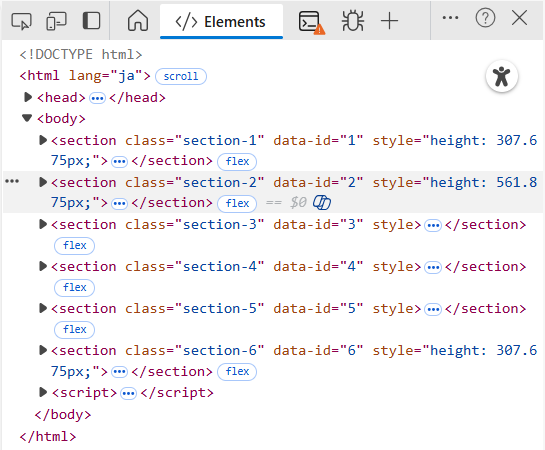
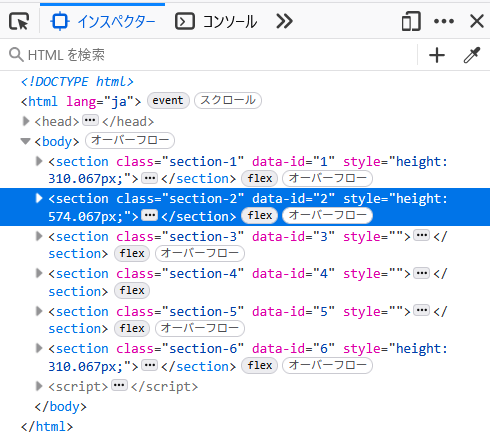
Mastodonではタイムラインの画面で見えていない投稿はアップロードされた画像や動画などメディアのコードを消去して、タイムラインの画面で見えるようになったら復活させる。非表示ではなく、コードを消去している。コードを消去すると消去された投稿は高さが減少して、上の投稿が低くなったら下の投稿は上に引っ張られてしまうので、それを防ぐために消去されてない時のheightのCSSを投稿のタグに追加する。そして、見えている時は、そのCSSを消去する。
そんなアルゴリズムを再現して、6つのsectionを縦に並べ、その2番目のセクションにmp3音声を載せて、外部サービスで動画のように見せた。各セクションのheightはJavascriptに計算させている。隠れた時に直前に見えていた時のheightをタグに追記するようにしてある。
開発ツールの使用中でなくてもバグが生じるようにしたいのだが、いまだに実現せず、未完成だが、そのコードを載せておく。
<!DOCTYPE html>
<html lang="ja">
<head>
	<meta charset="UTF-8">
	<meta name="viewport" content="width=device-width, initial-scale=1.0">
	<title>スクロールバグ再現実験(20251217)</title>
	<script src="https://unpkg.com/wavesurfer.js@7"></script>
	<style>
		body { margin: 0; font-family: sans-serif; color: white; text-align: center; }
		section { padding: 50px; display: flex; flex-direction: column; align-items: center; justify-content: center; box-sizing: border-box; width:50%; margin: 0 auto;}
		.inner-box { background: rgba(255, 255, 255, 0.2); border: 2px solid rgba(255, 255, 255, 0.4); border-radius: 12px; padding: 30px; width: 80%; max-width: 600px; }
		.section-1 { background-color: #f39c12; }
		.section-2 { background-color: #2c3e50; }
		.section-3 { background-color: #27ae60; }
		.section-4 { background-color: #2980b9; }
		.section-5 { background-color: #8e44ad; }
		.section-6 { background-color: #c0392b; }

		.play-btn { padding: 8px 20px; cursor: pointer; border-radius: 20px; border: none; font-weight: bold; background: white; color: #2c3e50; }
	</style>
</head>
<body>

	<section class="section-1" data-id="1"><p>セクション1</p></section>
	<section class="section-2" data-id="2"><p>セクション2</p></section>
	<section class="section-3" data-id="3"><p>セクション3</p></section>
	<section class="section-4" data-id="4"><p>セクション4</p></section>
	<section class="section-5" data-id="5"><p>セクション5</p></section>
	<section class="section-6" data-id="6"><p>セクション6</p></section>

	<script>
		const contentTemplates = {
			1: '<h1>Section 01</h1>',
			2: '<h1>Section 02: Visualizer</h1><div id="waveform" style="min-height:0px;"></div><button class="play-btn" id="playPause">再生 / 停止</button>',
			3: '<h1>Section 03</h1>',
			4: '<h1>Section 04</h1>',
			5: '<h1>Section 05</h1>',
			6: '<h1>Section 06</h1>'
		};

		let wavesurfer = null;
		let currentTime = 0;
		let isPlaying = false;

		// 現在の波形表示エリアの「実測ピクセル高」を取得する関数
		function getWaveformHeight() {
			const temp = document.createElement('div');
			temp.style.height = '20vw';
			document.body.appendChild(temp);
			const h = temp.clientHeight;
			document.body.removeChild(temp);
			return h;
		}

		const observer = new IntersectionObserver((entries) => {
			entries.forEach(entry => {
				const id = entry.target.getAttribute('data-id');
				const parent = entry.target;

				if (entry.isIntersecting) {
					if (!parent.querySelector('.inner-box'))  {
						const newDiv = document.createElement('div');
						newDiv.className = 'inner-box';
						newDiv.innerHTML = contentTemplates[id];
						parent.appendChild(newDiv);

						// --- バグ誘発ポイント ---
						if (id === "2") {
							// 1. mp3の読み込みよりも先に高さを解除
							parent.style.height = "";

							// 2. 一瞬遅れて波形を生成し、高さを膨らませる
							requestAnimationFrame(() => {
								initWaveSurfer('#waveform', 'playPause');
							});
							//setTimeout(() => {
							//	initWaveSurfer('#waveform', 'playPause');
							//}, 2000);
						} else {
							requestAnimationFrame(() => { parent.style.height = ""; });
							//parent.style.height = "";
						}
					}
				} else {
					if (parent.children.length > 0) {
						// 離れる時に高精度な高さを保存
						const preciseHeight = parent.getBoundingClientRect().height;
						parent.style.height = preciseHeight + "px";

						if (id === "2" && wavesurfer) {
							isPlaying = wavesurfer.isPlaying();
							currentTime = wavesurfer.getCurrentTime();
							wavesurfer.destroy();
							wavesurfer = null;
						}
						const targetChild = parent.querySelector('.inner-box');
						if (targetChild) parent.removeChild(targetChild);
					}
				}
			});
		});

		document.querySelectorAll('section').forEach(section => observer.observe(section));

		function initWaveSurfer(containerId, btnId) {
			wavesurfer = WaveSurfer.create({
				container: containerId,
				waveColor: '#ffffff99',
				progressColor: '#ffffff',
				url: '/wp-content/uploads/2025/12/20240809_1.mp3',
				barWidth: 1,
				height: getWaveformHeight(),
				responsive: true
			});

			wavesurfer.on('ready', () => {
				wavesurfer.setTime(currentTime);
				if (isPlaying) wavesurfer.play();
			});

			const btn = document.getElementById(btnId);
			if(btn) {
				btn.onclick = () => {
					wavesurfer.playPause();
					isPlaying = wavesurfer.isPlaying();
				};
			}
		}

	   // リサイズ時に波形キャンバスの解像度を更新
		window.addEventListener('resize', () => {
			if (wavesurfer) {
				wavesurfer.setOptions({ height: getWaveformHeight() });
			}
		});
	</script>
</body>
</html>追記(2025/12/21 11:50):
開発者ツールを使わずにバグを再現できるようになった。そのコードは次の通り。
<!DOCTYPE html>
<html lang="ja">
<head>
<meta charset="UTF-8">
<meta name="viewport" content="width=device-width, initial-scale=1.0">
<title>スクロールバグ再現実験(20251221←20251217)</title>
<script src="https://unpkg.com/wavesurfer.js@7"></script>
<style>
	body { margin: 0; font-family: sans-serif; color: white; text-align: center; }
	section { padding: 50px; display: flex; flex-direction: column; align-items: center; justify-content: center; box-sizing: border-box; width:50%; margin: 0 auto;}
	.inner-box { background: rgba(255, 255, 255, 0.2); border: 2px solid rgba(255, 255, 255, 0.4); border-radius: 12px; padding: 30px; width: 80%; max-width: 600px; }
	.section-1 { background-color: #f39c12; }
	.section-2 { background-color: #2c3e50; }
	.section-3 { background-color: #27ae60; }
	.section-4 { background-color: #2980b9; }
	.section-5 { background-color: #8e44ad; }
	.section-6 { background-color: #c0392b; }
	.play-btn { padding: 8px 20px; cursor: pointer; border-radius: 20px; border: none; font-weight: bold; background: white; color: #2c3e50; }
</style>
</head>
<body>

<section class="section-1" data-id="1"><div><p>セクション1</p></div></section>
<section class="section-2" data-id="2"><div><p>セクション2</p></div></section>
<section class="section-3" data-id="3"><div><p>セクション3</p></div></section>
<section class="section-4" data-id="4"><div><p>セクション4</p></div></section>
<section class="section-5" data-id="5"><div><p>セクション5</p></div></section>
<section class="section-6" data-id="6"><div><p>セクション6</p></div></section>

<script>
	const contentTemplates = {
		1: '<div><h1>Section 01</h1></div>',
		2: '<div><h1>Section 02</h1><div id="waveform" style="min-height:0px;"></div><button class="play-btn" id="playPause">再生 / 停止</button></div>',
		3: '<div><h1>Section 03</h1></div>',
		4: '<div><h1>Section 04</h1></div>',
		5: '<div><h1>Section 05</h1></div>',
		6: '<div><h1>Section 06</h1></div>'
	};

	let wavesurfer = null;
	let currentTime = 0;
	let isPlaying = false;
	let section2FrozenHeight = null;

	// 現在の波形表示エリアの「実測ピクセル高」を取得する関数
	function getWaveformHeight() {
		const temp = document.createElement('div');
		temp.style.height = '20vw';
		document.body.appendChild(temp);
		const h = temp.clientHeight;
		document.body.removeChild(temp);
		return h;
	}

	const observer = new IntersectionObserver((entries) => {
		entries.forEach(entry => {
			const id = entry.target.getAttribute('data-id');
			const parent = entry.target;

			if (entry.isIntersecting) {
				// 高さの指定を解除
				parent.style.height = "";

				// '.inner-box'の生成
				if (!parent.querySelector('.inner-box'))  {
					const newDiv = document.createElement('div');
					newDiv.className = 'inner-box';
					newDiv.innerHTML = contentTemplates[id];
					parent.appendChild(newDiv);

					if (id === "2" && wavesurfer === null) {
						// --- バグ誘発ポイント ---
						// 1000ミリ秒(増やせば確実)待ってから波形を生成し、高さを膨らませる
						setTimeout(() => {
							// 波形の複数生成を防ぐ
							const container = document.querySelector('#waveform');
							if (!container) {
								return;
							}
							// 念のため(wavesurfer === null)を再確認して波形を生成する
							if (wavesurfer === null) {
								initWaveSurfer('#waveform', 'playPause');
							}
						}, 1000);
					}
				}
			} else {
				if (parent.children.length > 0) {
					// 離れる時にsectionのheightを取得してタグに指定
					if (id === "2" && section2FrozenHeight !== null) {
						parent.style.height = section2FrozenHeight + "px";
					} else {
						const preciseHeight = parent.getBoundingClientRect().height;
						parent.style.height = preciseHeight + "px";
					}

					if (id === "2" && wavesurfer) {
						// 音声の再生位置を保持
						// isPlaying = wavesurfer.isPlaying();
						// currentTime = wavesurfer.getCurrentTime();

						// heightを保持してから消去
						section2FrozenHeight = parent.getBoundingClientRect().height;
						wavesurfer.destroy();
						isPlaying = false;
						wavesurfer = null;
					}

					const targetChild = parent.querySelector('.inner-box');
					if (targetChild) parent.removeChild(targetChild);
				}
			}
		});
	});

	document.querySelectorAll('section').forEach(section => observer.observe(section));

	function initWaveSurfer(containerId, btnId) {
		wavesurfer = WaveSurfer.create({
			container: containerId,
			waveColor: '#ffffff99',
			progressColor: '#ffffff',
			url: '/wp-content/uploads/2025/12/20240809_1.mp3',
			barWidth: 1,
			// height: 200,
			height: getWaveformHeight(),
			responsive: true
		});

		wavesurfer.on('ready', () => {
			wavesurfer.setTime(currentTime);
			if (isPlaying) wavesurfer.play();
		});

		const btn = document.getElementById(btnId);
		if(btn) {
			btn.onclick = () => {
				wavesurfer.playPause();
				isPlaying = wavesurfer.isPlaying();
			};
		}
	}

   // リサイズ時に波形キャンバスの解像度を更新
	window.addEventListener('resize', () => {
		if (wavesurfer) {
			wavesurfer.setOptions({ height: getWaveformHeight() });
		}
	});
</script>
</body>
</html>
コメント